How to Save Whopper Clicker
The Whopper Clicker game saves itself in your browser every 10 seconds, so you never need to press anything to keep your progress. To make a backup or move to another device, use Export and Import in the game's Settings tab. This guide covers both, what can wipe a save, and how saves work across the main game page and our other pages.
Autosave
The game saves every 10 seconds while you play, and again when you switch to another tab, minimize the browser or close the page. The note under the burger says "Autosaves every 10 seconds" when everything is working.
If the browser blocks storage, the note changes to a warning. The game still runs, but nothing is kept once you close the tab, so export before you leave.
Export your save
- Open the Settings tab.
- Press Export save. A box appears with a line of text: that is your whole save.
- If your browser allows it, the text is already copied. Otherwise, select it and copy it yourself.
- Paste it somewhere safe, such as a note or an email to yourself.
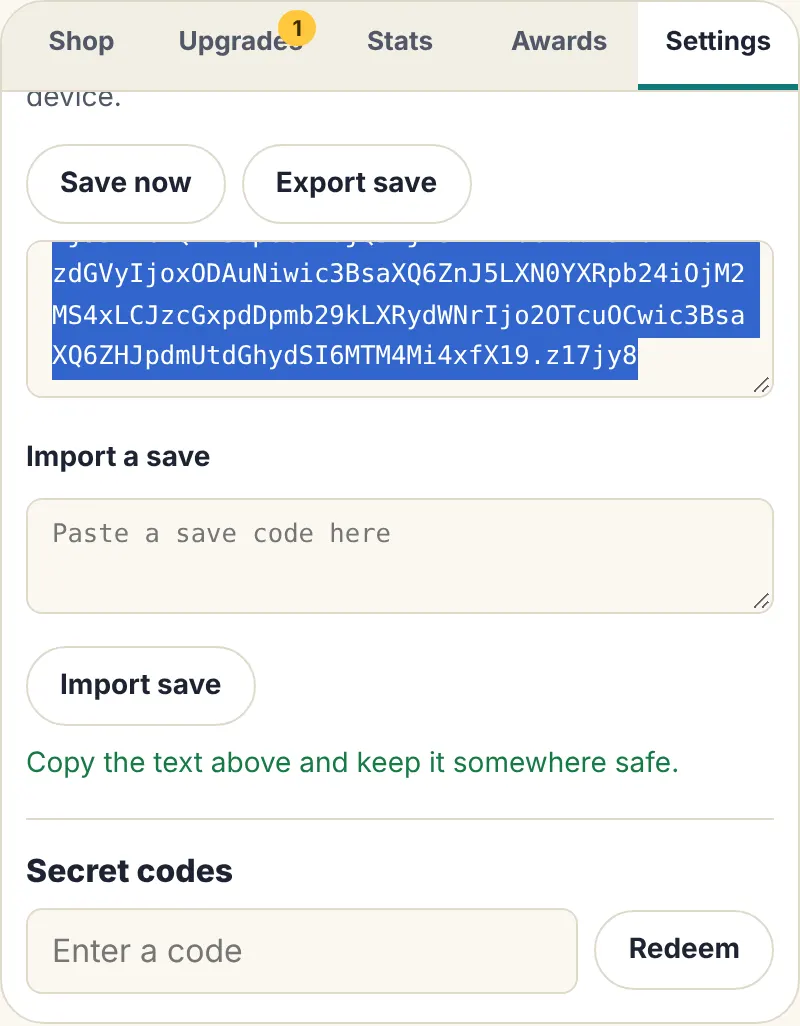
The code includes everything: burgers, producers, upgrades, achievements, codes you redeemed, skins and your speedrun splits.
Import a save
- Open Settings in the game where you want the save.
- Paste the code into the Import a save box. Extra spaces or line breaks from email or chat apps are fine.
- Press Import save. Your progress loads straight away.
Importing replaces the save in that browser, so export the current one first if you want to keep it. A code from a different game is refused, and so is a code that was cut short when copying. A normal save cannot be imported into sandbox mode, or the other way round.
What can wipe a save
- Clearing site data or browsing history with "cookies and site data" ticked.
- Private or incognito windows, which forget everything when you close them.
- Reset progress in Settings, which asks you to press it twice before erasing.
- Some cleaner apps and browser settings that clear storage automatically.
An exported code is your only backup, because we never keep a copy. Export now and then, especially before clearing your browser.
Time away
When you come back, the game adds what your producers made while you were gone, counted in full for up to 4 hours. If you were away for more than 1 minute, a "Welcome back" message tells you how much. Bonuses do not run while you are away.
Which pages share a save
- The main game and the unblocked page share one save, in the same browser. Switch between them freely.
- Whopper Clicker 2 has its own save. Rebirths there never touch your first game.
- Sandbox mode has its own save too, separate from your real progress.
- Each of our other games keeps its own save.
Moving to another device
Saves live in one browser on one device: Chrome and Firefox on the same computer each keep their own. To move, export on the old device, send the code to yourself, and import on the new one. The mobile guide has tips for phones and Chromebooks, and the codes guide explains sandbox mode.
Frequently asked questions
Does Whopper Clicker save automatically?
Yes, every 10 seconds, plus whenever you switch tabs or close the page. Save now in Settings saves on the spot.
Can I play the same save on my phone and my computer?
Yes, by moving it: Export on one device, Import on the other. Saves do not sync on their own, because they live in each browser.
Is my save stored on your servers?
No. It stays in your browser on your device. That keeps it private, but it also means only an exported copy can bring it back if it is deleted.
Will an old save code still work after the game is updated?
The save format carries a version number so the game can read older saves. Anything a newer version no longer recognizes is dropped safely instead of breaking the save.